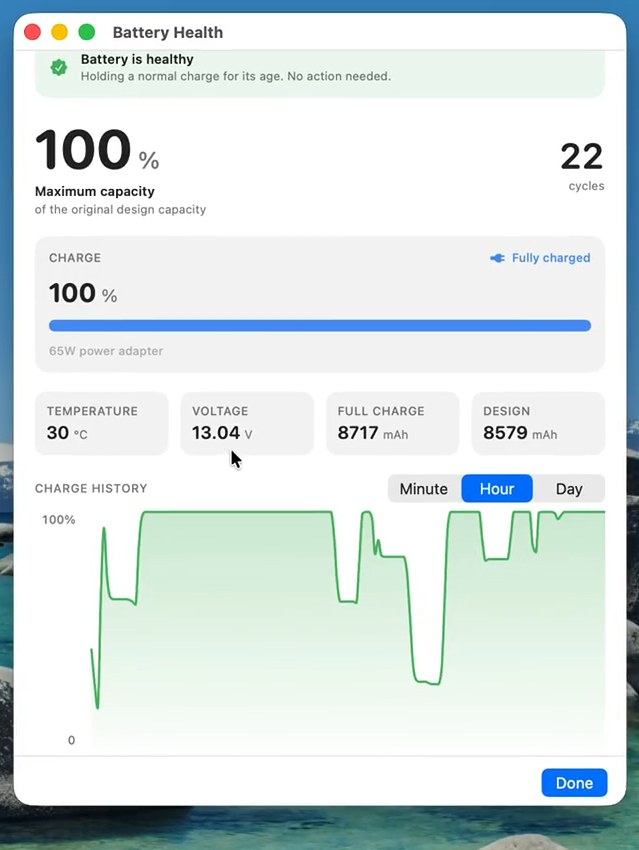
Real screenshot from the current release. Click to zoom.
Mojo Pulse / Tools / Battery health
Battery healthmacOS buries your battery's real condition three menus deep and rounds off the interesting parts. Pulse puts the whole story on one screen, with a verdict in plain English at the top.
Real screenshot from the current release. Click to zoom.
Maximum capacity as a percentage of the battery's original design, next to the cycle count — the two numbers that actually determine whether a battery is healthy, aging, or due for service. Pulse reads them straight from the hardware and says which.
Current charge, time to full or empty, the adapter's real wattage, temperature and voltage. Useful when a Mac “won't charge” and the answer turns out to be a 5-watt phone brick.
A charge-history chart built from per-minute samples shows the rhythm of your battery's life — the overnight drains, the all-day-on-power stretches — so changes stand out instead of hiding in the moment.
Battery health is one of eighteen tools in the free download. 9.5 MB, notarized by Apple.
Keep exploring: Disk usage · Processes · all 18 tools